Showing posts with label gRPC Testing. Show all posts

Sunday, September 28, 2025

Vulnerability Testing for gRPC APIs: What Every Tester Should Know

As an API developer/tester, you need to ensure your API endpoints are secure and protected from vulnerabilities. Failing to properly test API security can have serious consequences – like data breaches, unauthorized access, and service disruptions.

This blog post will provide you with practical guidance on best practices for testing the security of API endpoints, including a step-by-step technical example of how to test gRPC endpoints. It outlines the types of security testing that should be performed and the different types of security vulnerabilities that can be found in API endpoints and provides tips for remediation. By following the guidance in this article, you can build a robust security testing plan for your API endpoints.

OWASP API Security Checklist: The Types of Tests to Perform

To ensure the security of your API endpoints, you should perform several types of testing, as recommended in the OWASP API Security Checklist. By performing these types of tests regularly, you can gain assurance that your API endpoints are secure and address any vulnerabilities that are identified to protect your APIs and your consumers.

  • Penetration testing examines API endpoints for vulnerabilities that could allow unauthorized access or control. This includes testing for injection flaws, broken authentication, sensitive data exposure, XML external entities (XXE), broken access control, security misconfigurations, and insufficient logging and monitoring.
  • Fuzz testing, or fuzzing, submits invalid, unexpected, or random data to API endpoints to uncover potential crashes, hangs, or other issues. This can detect memory corruption, denial-of-service, and other security risks.
  • Static application security testing (SAST) analyzes API endpoint source code for vulnerabilities. This is useful for finding injection flaws, broken authentication, sensitive data exposure, XXE, and other issues early in the development lifecycle.
  • Dynamic application security testing (DAST) tests API endpoints by sending HTTP requests and analyzing the responses. This can uncover issues like injection, broken authentication, access control problems, and security misconfigurations.
  • Abuse case testing considers how API endpoints could potentially be misused and abused. The goal is to identify ways that the API could be used for malicious purposes so that appropriate controls and protections can be put in place.


Common API Vulnerabilities and How to Test for Them

To ensure the security of your API endpoints, you must test for common vulnerabilities. Some of the major issues to check for include:

  • SQL injection: This occurs when malicious SQL statements are inserted into API calls. Test for this by entering ' or 1=1;-- into API parameters to see if the database returns an error or additional data.
  • Cross-site scripting (XSS): This allows attackers to execute malicious JavaScript in a victim's browser. Try entering into API parameters to check for reflected XSS.
  • Broken authentication: This allows unauthorized access to API data and functionality. Test by attempting to access API endpoints with invalid or missing authentication credentials to verify that users are properly authenticated.
  • Sensitive data exposure: This occurs when API responses contain personally identifiable information (PII) or other sensitive data. Review API responses to ensure no sensitive data is returned.
  • Broken access control: This allows unauthorized access to API resources. Test by attempting to access API endpoints with different user roles or permissions to verify proper access control is in place.

Testing gRPC Endpoints: A Technical Example

Integration Testing gRPC Endpoints in Python 

To ensure your gRPC API endpoints are secure, you should perform integration testing. This involves sending requests to your API and analyzing the responses to identify any vulnerabilities.

Step 1 

First, use a tool like Postman, Insomnia, or BloomRPC to send requests to your gRPC server. Test all endpoints and methods in your API.

  • Set up a gRPC channel and stub to connect to the server.
  • Call the appropriate gRPC methods on the stub to send requests and receive responses.

#import the relevant modules 

import grpc

import your_service_pb2 as your_service

import your_service_pb2_grpc as your_service_grpc


def test_integration():

    # Test all endpoints and methods in your API.

    channel = grpc.insecure_channel('your_grpc_endpoint_address:port')

    stub = your_service_grpc.YourServiceStub(channel)

    test_endpoint_1(stub)

    test_endpoint_2(stub)

Step 2 

Next, analyze the responses for information disclosure. Make sure that no sensitive data is returned in error messages or stack traces.

  • In the test_endpoint_1 function, send a request to Endpoint 1.
  • Handle any exceptions that occur during the request and analyze the error message or status code for potential information disclosure.

def test_endpoint_1(stub):


    try:

        request = your_service.Endpoint1Request(param1='value1', param2='value2')

        response = stub.Endpoint1Method(request)

        print("Endpoint 1 response:", response)

    except grpc.RpcError as e:

        print("Error occurred in Endpoint 1:", e.details())

Step 3

Then, test for broken authentication by sending requests without authentication credentials. The API should return a “401 Unauthorized” status code.

  • In the test_endpoint_2 function, send a request to Endpoint 2 without providing authentication credentials.

Catch any grpc.RpcError exceptions that occur and check the error code to ensure that it is “401 Unauthorized.”

def test_endpoint_2(stub):

    ```

Test for broken authentication.

    Send requests without authentication credentials.

    The API should return a 401 Unauthorized status code.

```

    try:

        request = your_service.Endpoint2Request(param1='value1', param2='value2')

        response = stub.Endpoint2Method(request)

        print("Endpoint 2 response:", response)

    except grpc.RpcError as e:

        print("Error occurred in Endpoint 2:", e.code())

Step 4

Finally, execute the tests. Call the test methods you have defined in your script to execute the integration tests:

if __name__ == '__main__': 

test_integration()

It is important to note that gRPC API endpoint testing has many variations depending on the programming language and technologies you are using. For the example given above, there are many extension possibilities. 

For instance, you can further expand the code and add more test methods for other steps such as testing access control, handling malformed requests, checking TLS encryption, and reviewing API documentation for any discrepancies with the actual implementation.

Ongoing API Endpoint Security Testing Best Practices

To ensure that API endpoints remain secure over time, ongoing security testing is essential. Schedule regular vulnerability scans and penetration tests to identify any weaknesses that could be exploited.

Conduct Regular Vulnerability Scans

Run automated vulnerability scans on API endpoints at least monthly. Scan for issues like:

  • SQL injection
  • Cross-site scripting
  • Broken authentication
  • Sensitive data exposure

Remediate any critical or high-severity findings immediately. Develop a plan to address medium- and low-severity issues within 30-90 days.

Perform Penetration Tests

Have an independent third party conduct penetration tests on API endpoints every 6-12 months. Penetration tests go deeper than vulnerability scans to simulate real-world attacks. Testers will attempt to access sensitive data or take control of the API. Address any issues found to strengthen endpoint security.

Monitor for Anomalous Behavior

Continuously monitor API endpoints for abnormal behavior that could indicate compromise or abuse. Look for things like:

  • Sudden spikes in traffic
  • Requests from unknown or suspicious IP addresses
  • Invalid requests or requests attempting to access unauthorized resources

Investigate anything unusual immediately to determine if remediation is needed. Monitoring is key to quickly detecting and responding to security events.

Review Access Controls

Review API endpoint access controls regularly to ensure that only authorized users and applications can access data and resources. Remove any unused, outdated, or unnecessary permissions to limit exposure. Access controls are a critical line of defense, so keeping them up-to-date is important for security.

Conclusion

In conclusion, testing the security of API endpoints should be an ongoing process to protect systems and data. By following best practices for identifying vulnerabilities through various types of security testing, you can remediate issues and strengthen endpoint security over time. 

While the examples above focused on gRPC endpoints, the overall guidelines apply to any API. Regularly testing API endpoints is key to avoiding breaches and ensuring the integrity of your infrastructure. Make security testing a priority and keep your endpoints protected.

From REST to gRPC and Beyond


Testing gRPC APIs

Major platforms like Google Cloud Platform (GCP), Kubernetes, and Envoy leverage gRPC’s capabilities in their high-performance services.

Without further ado, let’s start with some pre-requisites:

  1. Install Git https://git-scm.com/downloads
  2. Install VS Code: https://code.visualstudio.com/download
  3. Install Node JS from https://nodejs.org/en
  4. Install PlayWright Extension in VS Code: https://playwright.dev/docs/getting-started-vscode

Setting up local gRPC Server

After making sure all pre-requisites have been followed, first let’s start by having our local gRPC product service available. Follow the steps given below to have the service available:

  1. Open the page “https://github.com/nsharmapunjab/frameworks_and_tools/tree/main/grpc_tools/gRPC_sample_server” and follow the instructions given on the page to clone the repo.
  2. Open the cloned repo in VS Code
  3. Run “npm install” command in terminal to install the dependencies
  4. Then run “node server.js” command, with this it will start the server at “http://127.0.0.1:50051/

On a high-level, this gRPC service is a simple server for managing products. It provides three main functionalities: adding a product, retrieving a product by its ID, and listing all products. Below is an explanation of each functionality with examples:

Add Product

The addProduct function allows clients to add a new product to the server.

Example Request:

{
"name": "Laptop",
"description": "A high-end gaming laptop",
"price": 1500.00
}

Example Response:

{
"product_id": 1,
"message": "Product added successfully"
}

Get Product

The getProduct function allows clients to retrieve a product by its ID.

Example Request:

{
"product_id": 1
}

Example Response:

{
"product_id": 1,
"name": "Laptop",
"description": "A high-end gaming laptop",
"price": 1500.00
}

3. List Products

The listProducts function allows clients to retrieve a list of all products.

Example Request:

{}

Example Response:

{
"products":
[
{
"product_id": 1,
"name": "Laptop",
"description": "A high-end gaming laptop",
"price": 1500.00
}
]
}

Excellent work! Our gRPC APIs under test are operational.
Now let’s perform some steps to see if this is working on not, try to play with it in Postman by following the guide here: https://learning.postman.com/docs/sending-requests/grpc/first-grpc-request/

You should be able to see three methods as shown below:

Press enter or click to view image in full size

Develop Automated Tests

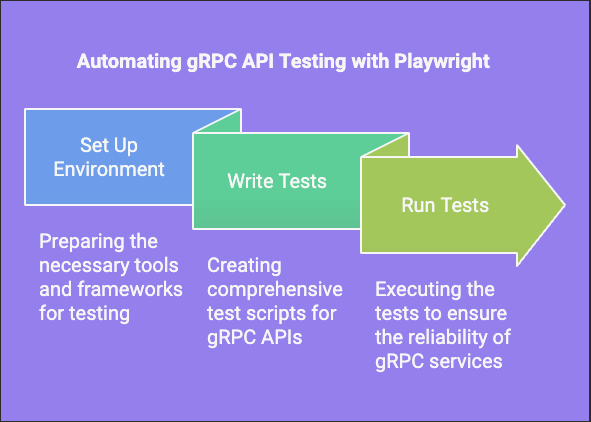
Now everything is up and running, so let’s start automating gRPC API testing with our favorite tool i.e. Playwright. Follow steps given below to have some automated tests to validate the APIs:

  1. To create a base Playwright project using the VS Code extension: Open VS Code and create a new folder named “grpc-tests”.
  2. Open the terminal and follow the instructions provided at https://playwright.dev/docs/intro.
  3. The above step will generate the basic project structure with sample tests in the “tests” folder.
  4. Run “npx playwright test” in the terminal to execute the tests. The results will be displayed in the terminal. Nice work, now you have Playwright project setup to start with.
  5. Delete all the tests files under tests and tests-examples folders.
  6. Open the terminal in VS Code and run following command to install the required dependencies:
npm install @playwright/test @types/node @grpc/grpc-js @grpc/proto-loader protobufjs
Purpose of Libraries
=====================
@playwright/test: A testing framework for end-to-end testing with Playwright.
@types/node: TypeScript type definitions for Node.js.
@grpc/grpc-js: The gRPC library for Node.js, used to create and manage gRPC
clients and servers.
@grpc/proto-loader: A library to load .proto files for use with grpc-js.
protobufjs: A library for working with Protocol Buffers in JavaScript.

7. Create a folder “proto” under main folder i.e. grpc-tests folder, create a product.proto file under this folder and add following content (This is the API schema file Protobuf file for the service under test):

syntax = "proto3";

package product;

service ProductService {
rpc AddProduct (AddProductRequest) returns (AddProductResponse) {}
rpc GetProduct (GetProductRequest) returns (GetProductResponse) {}
rpc ListProducts (ListProductsRequest) returns (ListProductsResponse) {}
}

message AddProductRequest {
string name = 1;
string description = 2;
double price = 3;
}

message AddProductResponse {
int32 product_id = 1;
string message = 2;
}

message GetProductRequest {
int32 product_id = 1;
}

message GetProductResponse {
int32 product_id = 1;
string name = 2;
string description = 3;
double price = 4;
}

message ListProductsRequest {}

message ListProductsResponse {
repeated Product products = 1;
}

message Product {
int32 product_id = 1;
string name = 2;
string description = 3;
double price = 4;
}
The product.proto file defines the structure and services for a gRPC API that 
manages products. This file is used to generate the necessary code for the
client and server to communicate using gRPC.

Syntax and Package
===================
syntax = "proto3";: Specifies that this file uses Protocol Buffers "version 3".
package product;: Defines the package name as product.

Service Definition
====================
service ProductService: Defines a gRPC service named ProductService with three
methods:
AddProduct: Adds a new product.
GetProduct: Retrieves a product by its ID.
ListProducts: Lists all products.

Message Definitions
====================
AddProductRequest: The request message for adding a product, containing name,
description, and price.

AddProductResponse: The response message for adding a product, containing
product_id and message.

GetProductRequest: The request message for retrieving a product, containing
product_id.

GetProductResponse: The response message for retrieving a product, containing
product_id, name, description, and price.

ListProductsRequest: An empty request message for listing products.

ListProductsResponse: The response message for listing products, containing a
list of Product messages.

Product: A message representing a product, containing product_id, name,
description, and price.

8. Create a folder “utils” under main folder i.e. grpc-tests and create a grpcClient.ts file under this folder and add following content

import * as grpc from '@grpc/grpc-js';
import * as protoLoader from '@grpc/proto-loader';
import * as path from 'path';

// Load the protobuf
const PROTO_PATH = path.resolve(__dirname, '../proto/product.proto');
const packageDefinition = protoLoader.loadSync(PROTO_PATH, {
keepCase: true,
longs: String,
enums: String,
defaults: true,
oneofs: true,
});
const productProto = (grpc.loadPackageDefinition(packageDefinition) as any).product;

// Create a gRPC client
const client = new productProto.ProductService('localhost:50051', grpc.credentials.createInsecure());

export { client };

export const listProducts = async () => {
return new Promise((resolve, reject) => {
client.listProducts({}, (error: any, response: any) => {
if (error) {
reject(error);
} else {
resolve(response);
}
});
});
};

export const addProduct = async (request: any) => {
return new Promise((resolve, reject) => {
client.addProduct(request, (error: any, response: any) => {
if (error) {
reject(error);
} else {
resolve(response);
}
});
});
};

export const getProduct = async (request: any) => {
return new Promise((resolve, reject) => {
client.getProduct(request, (error: any, response: any) => {
if (error) {
reject(error);
} else {
resolve(response);
}
});
});
};
This file sets up a gRPC client to interact with a gRPC server using a 
protobuf definition.

Imports:

grpc: The gRPC library for Node.js.
protoLoader: A library to load .proto files.
path: A Node.js module for handling file paths.

Load the Protobuf:
==================
The path to the .proto file is resolved using path.resolve.
protoLoader.loadSync loads the protobuf definition from the specified file.
The loaded definition is then used to create a gRPC service client.

Create a gRPC Client:
=====================
A gRPC client is created for the ProductService defined in the protobuf,
connecting to a server running on localhost:50051.

Export the Client and API Functions:
The client is exported for use in other parts of the application.
listProducts: An asynchronous function that calls the listProducts method on
the gRPC client and returns a promise.

9. Now create a test file under the “tests” folder with name “product.spec.ts”, and add following contents:

import { test, expect } from '@playwright/test';
import { client, listProducts, addProduct, getProduct } from '../utils/gprcClient'

var productId = 0;
test.beforeAll('Get the max product id', async () => {
console.log('Fetching the list of products...');
const response = await listProducts() as { products: { id: number }[] };
const products = await response.products;
if (products.length > 0) {
productId = Math.max(...products.map((product: any) => product.product_id));
}
console.log(`Max product ID found: ${productId}`);
});

test('Add Product API to add product', async () => {
const request = { name: "Macbook 14 inches M4", description: "Latest M4 Macbook Pro", price: 4000.0 };
console.log('Adding a new product:', request);
const response = await addProduct(request);
console.log('Add Product Response:', response);
expect(response).toEqual({ message: 'Product added successfully', product_id: productId + 1 });
});

test('Get Latest Product Details', async () => {
const request = { product_id: productId + 1 };
console.log('Fetching details for product ID:', request.product_id);
const response = await getProduct(request);
console.log('Get Product Response:', response);
expect(response).toEqual({ name: 'Macbook 14 inches M4', description: 'Latest M4 Macbook Pro', price: 4000.0, product_id: productId + 1 });
});

test('Add Product API to check validation', async () => {
const request = { name: "Macbook 14 inches M4", description: "", price: 4000.0 };
console.log('Adding a new product with invalid data:', request);
const response = await addProduct(request).catch(error => ({ message: error.message, code: error.code }));
console.log('Validation Error Response:', response);
expect(response).toEqual({ message: '3 INVALID_ARGUMENT: Name, description, and price are required', code: 3 });
});
The main purpose of the tests in the product.spec.ts file is to verify the 
functionality of the product-related APIs in a gRPC service. Specifically,
the tests aim to -

Fetch the maximum product ID: Before running the tests, the beforeAll hook fetches
the list of products and determines the maximum product ID. This is used to
ensure that new products are added with a unique ID.

Add a new product: The first test (Add Product API to add product) checks if a
new product can be successfully added to the system. It verifies that the
response contains a success message and the correct product ID.

Get details of the latest product: The second test (Get Latest Product Details)
retrieves the details of the newly added product and verifies that the response
contains the correct product information.

Validate product addition with invalid data: The third test (Add Product API
to check validation) attempts to add a product with invalid data (missing
description) and checks if the appropriate validation error is returned.

10. Run the tests by running “npx playwright test” command in terminal :

Press enter or click to view image in full size

Excellent work on automating your first gRPC API!

Should you encounter any problems, please feel free to leave a comment here or contact me via LinkedIn.

Ready to dive deeper? Try writing a test that verifies the API returns a “Product not found” error when you use a product_id that doesn’t exist.

In conclusion,
Grasping the fundamental purpose of the new API architecture (gRPC) was key to our ability to create effective testing methods and automation for these APIs. I hope this article can assist learning and approach to testing with this new API architecture. Looking forward to your feedback or suggestions.

Keep learning! In the next article, we’ll explore a different API architecture and its testing strategy.

My Profile

My photo
can be reached at 09916017317